I was really expecting a lot more wind. We didn't get more than a bit of gusting (20mph?) now and then. It was the flooding that took out the power.
Tardhaus is fairly high, so we weren't worried about flooding damage, although there is a bit of water in the basement. When the power went out, we transferred over to generator. We have an old generator powerful enough to run the whole house running off a rebuilt 1.6L VW Jetta diesel engine. Through several mistakes, the generator overheated, overpressurized the cooling system (pressure cap didn't release), and ruptured one of the coolant lines. The generator was shut down using the kill switch shortly thereafter, but damage to the engine was likely already done by that time.
We triaged the engine, repaired the coolant system hose, and discovered it was also very low on oil - this is odd as it usually only leaks very very slowly when running. We put more oil in, refueled, and started it back up - it seemed to be running fine.
About 10-20 minutes later, the engine started "dieseling", revving higher and higher. The "panic/kill" switch was used (this cuts off the fuel), but the engine kept revving higher and higher. All tards quickly evacuated the vicinity of the generator and the circuit breaker was thrown to disconnect the generator from the house. We then waited about 2-3 minutes as the engine continued to rev well past it's rated RPM limits. It was known that we were now simply waiting for the engine to destroy itself and stop on its own. As the fuel valve has been turned off by the kill switch, the engine was likely running off its engine oil, which was getting into the cylinders via damage caused by the previous overheating - nothing to do but wait for it to stop by itself.
After some knocking and crunch noises, the engine stopped. Post inspection showed no fire and the engine would turn over and run, but the generator didn't turn.
Saturday, September 10, 2011

Friday, August 19, 2011


Making Google Search stop autocompleting and autosuggesting
Google's autosuggest feature finally got annoying enough that I decided to do something about it. If I paused long enough to think about what to type next and then tried to use the arrow keys to modify my text, the autosuggested stuff would be inserted into my search textbox. Occasionally autosuggest stuff got inserted even without the use of any arrow keys. Google failure.
I tried turning off Google Instant, and the description says: predictions and results appear while typing
That sounds like, when turned off, it should stop the annoying behavior. No dice. It turns off the automatic results display, but not the automatic suggestions about what you are typing.
More digging found that adding the parameter complete=0 to the URL turns off the annoyances, and that works well for my home page, which is now:
http://www.google.com/?complete=0
The issue is that it still autosuggests in the firefox search box. That took a bit more digging, as FireFox wants you to download new search engines, but doesn't appear to let you make your own through any of the settings dialogs. I created a file in c:\Program Files\Mozilla Firefox\searchplugins named unstupidgoogle.xml and put the following contents in it:
----------------------------------------------------------
<SearchPlugin xmlns="http://www.mozilla.org/2006/browser/search/">
<ShortName>Unstupid Google</ShortName>
<Description>Google Search</Description>
<InputEncoding>UTF-8</InputEncoding>
<Image width="16" height="16">data:image/png;base64,AAABAAEAEBAAAAEAGABoAwAAFgAAACgAAAAQAAAAIAAAAAEAGAAAAAAAAAAAAAAAAAAAAAAAAAAAAAAAAAAAAADs9Pt8xetPtu9FsfFNtu%2BTzvb2%2B%2Fne4dFJeBw0egA%2FfAJAfAA8ewBBegAAAAD%2B%2FPtft98Mp%2BwWsfAVsvEbs%2FQeqvF8xO7%2F%2F%2F63yqkxdgM7gwE%2FggM%2BfQA%2BegBDeQDe7PIbotgQufcMufEPtfIPsvAbs%2FQvq%2Bfz%2Bf%2F%2B%2B%2FZKhR05hgBBhQI8hgBAgAI9ewD0%2B%2Fg3pswAtO8Cxf4Kw%2FsJvvYAqupKsNv%2B%2Fv7%2F%2FP5VkSU0iQA7jQA9hgBDgQU%2BfQH%2F%2Ff%2FQ6fM4sM4KsN8AteMCruIqqdbZ7PH8%2Fv%2Fg6Nc%2Fhg05kAA8jAM9iQI%2BhQA%2BgQDQu6b97uv%2F%2F%2F7V8Pqw3eiWz97q8%2Ff%2F%2F%2F%2F7%2FPptpkkqjQE4kwA7kAA5iwI8iAA8hQCOSSKdXjiyflbAkG7u2s%2F%2B%2F%2F39%2F%2F7r8utrqEYtjQE8lgA7kwA7kwA9jwA9igA9hACiWSekVRyeSgiYSBHx6N%2F%2B%2Fv7k7OFRmiYtlAA5lwI7lwI4lAA7kgI9jwE9iwI4iQCoVhWcTxCmb0K%2BooT8%2Fv%2F7%2F%2F%2FJ2r8fdwI1mwA3mQA3mgA8lAE8lAE4jwA9iwE%2BhwGfXifWvqz%2B%2Ff%2F58u%2Fev6Dt4tr%2B%2F%2F2ZuIUsggA7mgM6mAM3lgA5lgA6kQE%2FkwBChwHt4dv%2F%2F%2F728ei1bCi7VAC5XQ7kz7n%2F%2F%2F6bsZkgcB03lQA9lgM7kwA2iQktZToPK4r9%2F%2F%2F9%2F%2F%2FSqYK5UwDKZAS9WALIkFn%2B%2F%2F3%2F%2BP8oKccGGcIRJrERILYFEMwAAuEAAdX%2F%2Ff7%2F%2FP%2B%2BfDvGXQLIZgLEWgLOjlf7%2F%2F%2F%2F%2F%2F9QU90EAPQAAf8DAP0AAfMAAOUDAtr%2F%2F%2F%2F7%2B%2Fu2bCTIYwDPZgDBWQDSr4P%2F%2Fv%2F%2F%2FP5GRuABAPkAA%2FwBAfkDAPAAAesAAN%2F%2F%2B%2Fz%2F%2F%2F64g1C5VwDMYwK8Yg7y5tz8%2Fv%2FV1PYKDOcAAP0DAf4AAf0AAfYEAOwAAuAAAAD%2F%2FPvi28ymXyChTATRrIb8%2F%2F3v8fk6P8MAAdUCAvoAAP0CAP0AAfYAAO4AAACAAQAAAAAAAAAAAAAAAAAAAAAAAAAAAAAAAAAAAAAAAAAAAAAAAAAAAAAAAAAAAAAAAAAAAAAAAAAAAACAAQAA</Image>
<Url type="text/html" method="GET" template="http://www.google.com/search">
<Param name="q" value="{searchTerms}"/>
<Param name="ie" value="utf-8"/>
<Param name="oe" value="utf-8"/>
<Param name="aq" value="t"/>
<Param name="complete" value="0"/>
<!-- Dynamic parameters -->
<Param name="rls" value="{moz:distributionID}:{moz:locale}:{moz:official}"/>
<MozParam name="client" condition="defaultEngine" trueValue="firefox-a" falseValue="firefox"/>
</Url>
<SearchForm>http://www.google.com/</SearchForm>
</SearchPlugin>
---------------------------------------------------------------------------
This is essentially a copy of the google.xml file but with the stupid autosuggest removed both in the firefox search box and also in the search entry that comes up at the top of the results. After you restart firefox, it will show up in the list of possible search engines as "Unstupid Google".
I tried turning off Google Instant, and the description says: predictions and results appear while typing
That sounds like, when turned off, it should stop the annoying behavior. No dice. It turns off the automatic results display, but not the automatic suggestions about what you are typing.
More digging found that adding the parameter complete=0 to the URL turns off the annoyances, and that works well for my home page, which is now:
http://www.google.com/?complete=0
The issue is that it still autosuggests in the firefox search box. That took a bit more digging, as FireFox wants you to download new search engines, but doesn't appear to let you make your own through any of the settings dialogs. I created a file in c:\Program Files\Mozilla Firefox\searchplugins named unstupidgoogle.xml and put the following contents in it:
----------------------------------------------------------
<SearchPlugin xmlns="http://www.mozilla.org/2006/browser/search/">
<ShortName>Unstupid Google</ShortName>
<Description>Google Search</Description>
<InputEncoding>UTF-8</InputEncoding>
<Image width="16" height="16">data:image/png;base64,AAABAAEAEBAAAAEAGABoAwAAFgAAACgAAAAQAAAAIAAAAAEAGAAAAAAAAAAAAAAAAAAAAAAAAAAAAAAAAAAAAADs9Pt8xetPtu9FsfFNtu%2BTzvb2%2B%2Fne4dFJeBw0egA%2FfAJAfAA8ewBBegAAAAD%2B%2FPtft98Mp%2BwWsfAVsvEbs%2FQeqvF8xO7%2F%2F%2F63yqkxdgM7gwE%2FggM%2BfQA%2BegBDeQDe7PIbotgQufcMufEPtfIPsvAbs%2FQvq%2Bfz%2Bf%2F%2B%2B%2FZKhR05hgBBhQI8hgBAgAI9ewD0%2B%2Fg3pswAtO8Cxf4Kw%2FsJvvYAqupKsNv%2B%2Fv7%2F%2FP5VkSU0iQA7jQA9hgBDgQU%2BfQH%2F%2Ff%2FQ6fM4sM4KsN8AteMCruIqqdbZ7PH8%2Fv%2Fg6Nc%2Fhg05kAA8jAM9iQI%2BhQA%2BgQDQu6b97uv%2F%2F%2F7V8Pqw3eiWz97q8%2Ff%2F%2F%2F%2F7%2FPptpkkqjQE4kwA7kAA5iwI8iAA8hQCOSSKdXjiyflbAkG7u2s%2F%2B%2F%2F39%2F%2F7r8utrqEYtjQE8lgA7kwA7kwA9jwA9igA9hACiWSekVRyeSgiYSBHx6N%2F%2B%2Fv7k7OFRmiYtlAA5lwI7lwI4lAA7kgI9jwE9iwI4iQCoVhWcTxCmb0K%2BooT8%2Fv%2F7%2F%2F%2FJ2r8fdwI1mwA3mQA3mgA8lAE8lAE4jwA9iwE%2BhwGfXifWvqz%2B%2Ff%2F58u%2Fev6Dt4tr%2B%2F%2F2ZuIUsggA7mgM6mAM3lgA5lgA6kQE%2FkwBChwHt4dv%2F%2F%2F728ei1bCi7VAC5XQ7kz7n%2F%2F%2F6bsZkgcB03lQA9lgM7kwA2iQktZToPK4r9%2F%2F%2F9%2F%2F%2FSqYK5UwDKZAS9WALIkFn%2B%2F%2F3%2F%2BP8oKccGGcIRJrERILYFEMwAAuEAAdX%2F%2Ff7%2F%2FP%2B%2BfDvGXQLIZgLEWgLOjlf7%2F%2F%2F%2F%2F%2F9QU90EAPQAAf8DAP0AAfMAAOUDAtr%2F%2F%2F%2F7%2B%2Fu2bCTIYwDPZgDBWQDSr4P%2F%2Fv%2F%2F%2FP5GRuABAPkAA%2FwBAfkDAPAAAesAAN%2F%2F%2B%2Fz%2F%2F%2F64g1C5VwDMYwK8Yg7y5tz8%2Fv%2FV1PYKDOcAAP0DAf4AAf0AAfYEAOwAAuAAAAD%2F%2FPvi28ymXyChTATRrIb8%2F%2F3v8fk6P8MAAdUCAvoAAP0CAP0AAfYAAO4AAACAAQAAAAAAAAAAAAAAAAAAAAAAAAAAAAAAAAAAAAAAAAAAAAAAAAAAAAAAAAAAAAAAAAAAAAAAAAAAAACAAQAA</Image>
<Url type="text/html" method="GET" template="http://www.google.com/search">
<Param name="q" value="{searchTerms}"/>
<Param name="ie" value="utf-8"/>
<Param name="oe" value="utf-8"/>
<Param name="aq" value="t"/>
<Param name="complete" value="0"/>
<!-- Dynamic parameters -->
<Param name="rls" value="{moz:distributionID}:{moz:locale}:{moz:official}"/>
<MozParam name="client" condition="defaultEngine" trueValue="firefox-a" falseValue="firefox"/>
</Url>
<SearchForm>http://www.google.com/</SearchForm>
</SearchPlugin>
---------------------------------------------------------------------------
This is essentially a copy of the google.xml file but with the stupid autosuggest removed both in the firefox search box and also in the search entry that comes up at the top of the results. After you restart firefox, it will show up in the list of possible search engines as "Unstupid Google".
Tuesday, May 24, 2011
My first completely useful casting!
I've been casting aluminum for a while, but haven't made a whole lot of actually useful things. Recently, Chief Tard asked if I could copy a latch handle from his snow machine, but put a hex opening where his has a splined opening. This allows him to use the latch pieces from a different year to repair his machine.
The handle was cast using my new oil-bonded sand. It came out awesome. It even has the original part numbers on it! I just taped up the splined hole when I made the mold, so it was completely solid with no hole when I cast it.
Making the hex hole was the difficult part. I don't have a rotary broach, so I made a hand tool to do the job.
 I made the tool from W-1 drill rod, using my CNC machine to create the hex shape. Then I used a ball end mill to "cup" the center of the tool. This puts enough of an edge on the corners that they will cut. Then I heated it red hot and quenched it in water to harden it.
 I drilled a small hole all the way through the handle, then a larger 5/16" hole (the hex is 5/16" across flats) most of the way through. Then I used a hammer and tapped the tool into the hole. The above photo is just after I started and it shows how the tool only cuts the sharp corners; the chips are visible.

 Here's a photo of the handle and the tool. The handle was cleaned up with a grinder and wire wheel, and should fit nicely on the snow machine.
The handle was cast using my new oil-bonded sand. It came out awesome. It even has the original part numbers on it! I just taped up the splined hole when I made the mold, so it was completely solid with no hole when I cast it.
Making the hex hole was the difficult part. I don't have a rotary broach, so I made a hand tool to do the job.


Here is the finished hex hole. This fits on a hex shaft and there is a screw that goes on the other side of the handle to hold it in place.

Saturday, May 14, 2011
Making the Man Candle
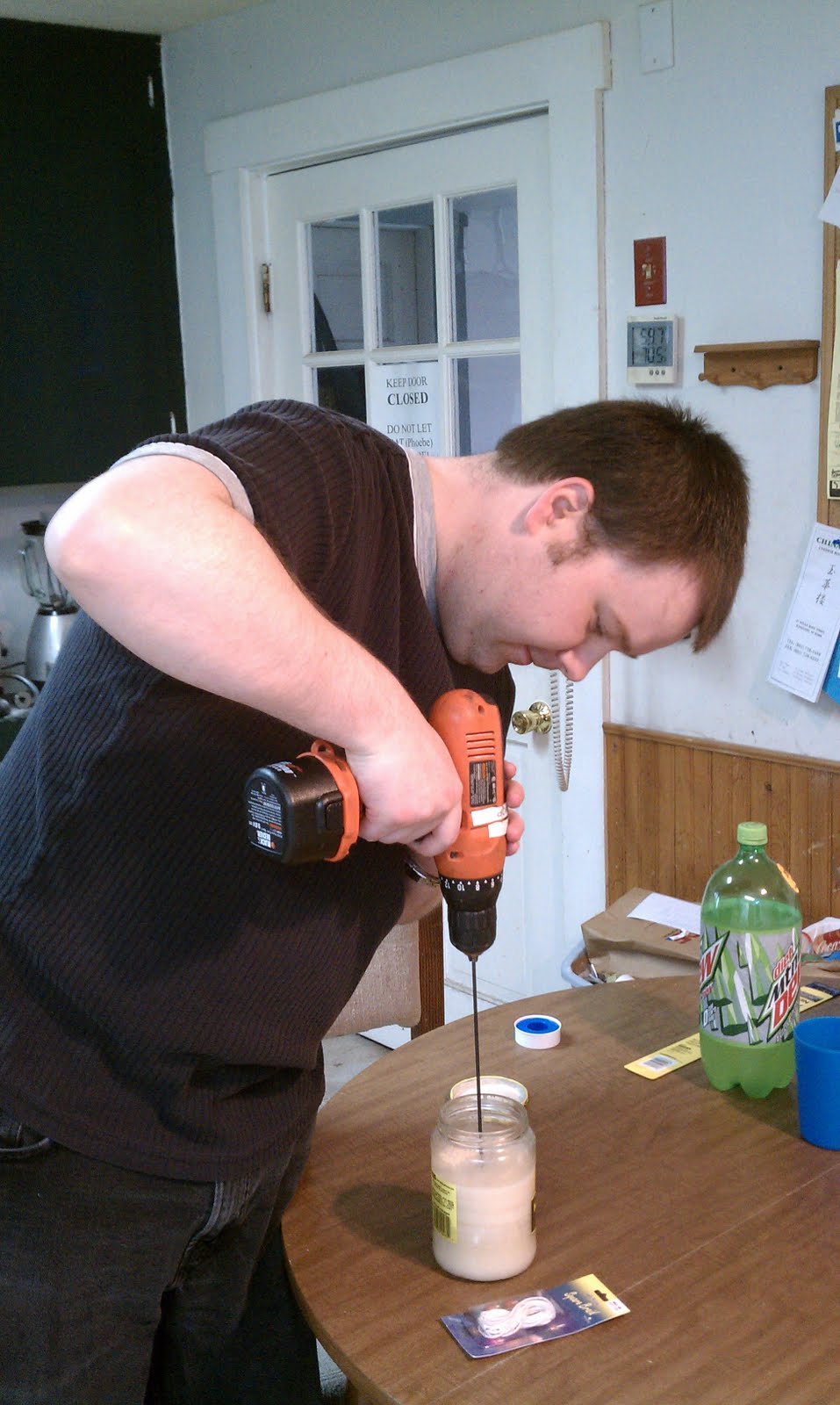
So... we saw this on the interwebs and thought it was an awesome idea. This is a manly candle, full of bacon flavor and odouriferousness. It's also a good recycling project as the only thing extra we bought was the wick.
Starting with a jar of saved bacon grease, a wick, and a drill....
 Use the drill to make a hole in the middle of the grease. This is a bit messy.
 Then install the wick. It took some trial and error to get the wick to stay in place.
 Then just light and enjoy the wonderful smell of bacon, without actually having to cook anything!

Starting with a jar of saved bacon grease, a wick, and a drill....



Friday, April 29, 2011
USB Building Blocks
Minion found an awesome and simple project on the interwebs for replacing the case of a USB thumb drive with one made from LEGO blocks. The people on the interwebs used an X-ACTO knife, but we have CNC machines at our disposal and decided to use those instead.
 We started with an unassuming LEGO block. Minion liked this red one.
 Minion took some basic measurements, and I used Dolphin PartMaster to generate some code to mill out the bottom and add an opening for the USB connector. I also thinned the walls of the block down to about 0.030 to make the thumb drive guts fit more easily.
 We also made a bottom plate to cover things up, and had to remove two of the nubs to make room for the USB connector. Because we thinned the walls of the lego block, we will have to glue this on.
 Only a little trimming with the X-Acto knife was required. Here are the pieces and tools ready for assembly.
 A Sandisk 4GB thumb drive...
 placed inside a lego block...
 with the bottom plate glued on...
 == awesomeness. We'll see if we can't get some pictures of the CNC machining next time when we make a blue one.


Monday, April 11, 2011
Brunch

Looks like breakfast... but it's lunchtime!

Then lunch showed up from the grill...

bottom bun + burger + cheese + bacon + ketchup + egg + top bun
== delicious!
Subscribe to:
Posts (Atom)